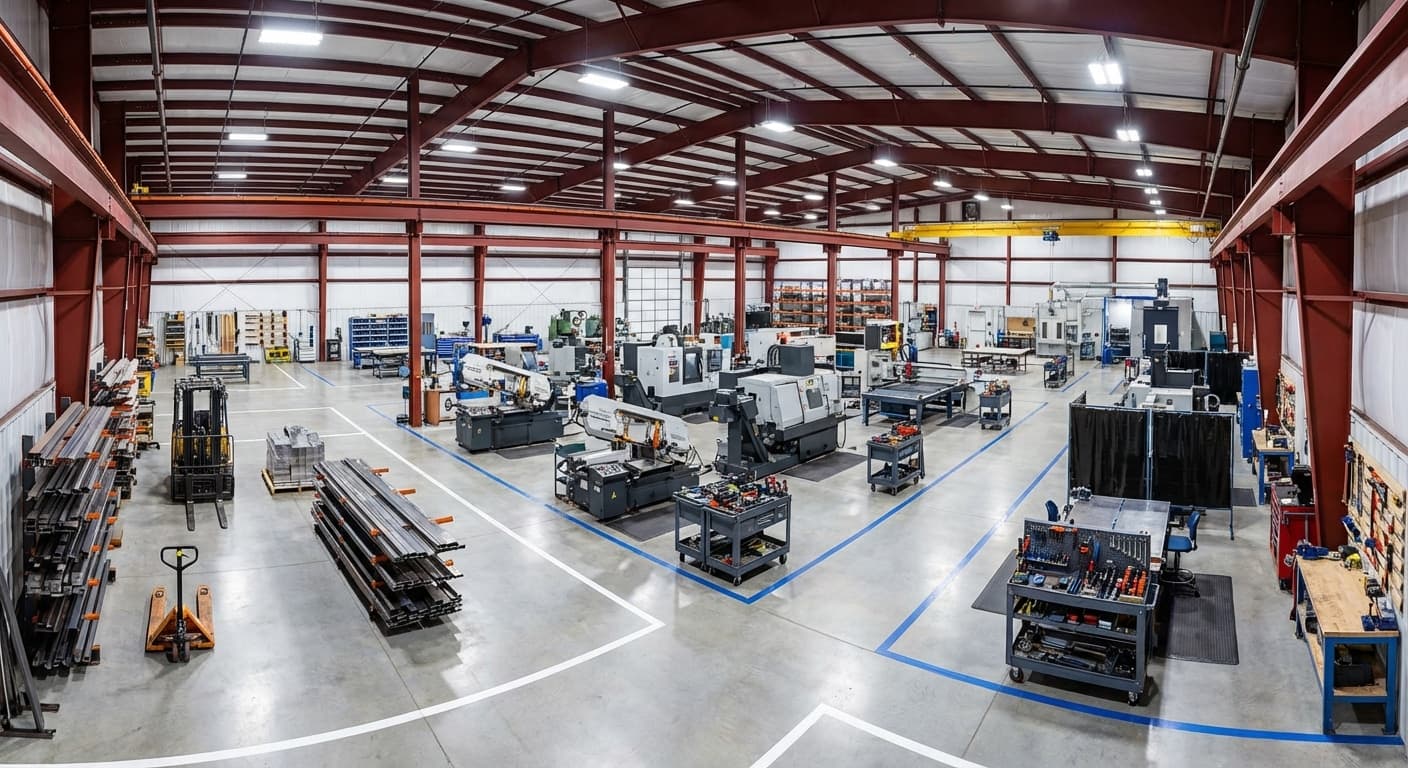

A 40×80 steel workshop only becomes a productivity powerhouse when every square foot is tuned for seamless tool flow, and this article shows exactly how to do it: start by mapping three straight-line zones–raw-in, production, finishing–so materials move forward, not back, then anchor the biggest machine and array every subsequent tool so each operation is an arm's reach away, eliminating the zig-zag hikes that devour 20 % of labor hours. Readers learn to size aisles for actual traffic (12 ft for forklifts, 8 ft for pallet jacks), choose clear-span framing for lifetime flexibility, and place columns around workflow instead of forcing equipment around posts, while mobile carts, French-cleat walls and Kanban-stocked consumables bring hourly-used items to the point of use, cutting retrieval walks to seconds. Integrated 3D layout software lets owners test dozens of configurations digitally before a single machine moves, and a smart color-coded floor-marking system keeps traffic flowing one-way without collisions. The payoff is immediate: shorter transit times, higher throughput, and a shop that adapts overnight to new products because no structural post locks yesterday's layout in place–turning the building itself into a competitive advantage.
Optimizing Floor Plan for Efficient Tool Flow
Design your 40×80 shop as a one-way, three-zone assembly line–raw-in, work-center, finish-out–then anchor each zone with its busiest machine so every cut, grind, or polish is a step, not a walk, away from the next.
Defining Work Zones Within the 40×80 workshop steel building
Your 40×80 steel building gives you 3,200 square feet of productive space, and smart zone planning turns that footprint into a time-saving machine. [1] The 80-foot length lets you create three distinct zones that flow naturally from one to the next: raw materials near your receiving door, production in the center where most work happens, and finishing or staging at the far end.
[2] This straight-line approach means your materials move in one direction — no backtracking, no crossovers, just forward progress from start to finish. The 40-foot width gives each zone enough room for parallel workstations or large equipment without creating bottlenecks.
Aligning Equipment Placement to Minimize Transit Distance
Once zones are established, equipment placement within each zone determines whether workers take two steps or twenty between operations. Start with your biggest, busiest machine — usually the primary saw or cutting station — and build your layout from there. [3] Place the next tool right where the previous operation ends. Your worker finishes a cut and turns to find the polisher within arm's reach, not across the shop.
These anchor machines set the flow for everything else, so get their placement right first. [4] Skip the old-school approach of grouping identical machines together. Yes, putting all grinders in one corner looks neat, but it forces materials to zigzag across your building. Instead, arrange tools by how you actually use them.
If your workflow needs two grinders at different stages, put them where the work needs them. [4] In your 40×80 space, a U-shaped or straight-line cell layout keeps workers moving forward, not backward. Tools follow the natural sequence of your work, and the return path stays short. [4] This task-based arrangement cuts walking time and boosts productivity — proven results from shops that made the switch.
Designing Clear Aisles for Safe and Fast Movement
Aisle width isn't a single number — it's a calculation based on what moves through the space. Start with your largest equipment and add the right safety buffer. Sit-down forklifts need 12 feet minimum. Stand-up reach trucks work in 10 feet. Pallet jacks manage with 8 feet.
[5] Your main aisle — the one running the full 80-foot length — should be 10-12 feet wide to keep traffic flowing smoothly between zones. Secondary aisles for foot traffic can be narrower. [6] Remember the tradeoff: wider aisles mean less work space, so size them for actual traffic, not wishful thinking. [7] Beyond width, smart traffic flow keeps your aisles moving. One-way patterns eliminate those head-on standoffs in busy zones.
Schedule heavy restocking and staging during shift changes, not peak production. [5] [6] For detailed guidance on color-coded floor markings and safety signage that speed navigation, see "Establishing Clear Signage and Color-Coded Pathways" below. These traffic management choices add up — every avoided collision and smooth turn saves seconds that compound across your shift.
Strategic Column and Beam Placement
Map your column grid to your work zones before you break ground–because the choice between clear-span freedom and multi-span savings locks in every forklift path, equipment footprint, and future layout change for the life of the building.
Mapping Structural Columns to Preserve Uninterrupted Work Areas
Your choice between clear-span and multi-span framing affects every workflow decision for the building's entire life. Clear-span construction eliminates interior columns completely — you get 3,200 square feet of unobstructed floor space that adapts as your operations evolve. [8] Multi-span saves upfront cost by adding interior columns, but those columns become permanent obstacles in your equipment paths and material flow. [8] When columns are necessary, placement beats presence every time.
Standard 25-to-30-foot bay spacing handles most tool-based production, while 40-to-50-foot spacing pays off where you run large equipment or high-traffic corridors. [8] Your work zones dictate column positions — not the other way around. Two design choices recover floor space without expanding your footprint. Flush girt systems mount wall girts even with column faces, gaining crucial inches along every wall where you mount benches or racking.
[9] Reverse-tapered columns push the structural taper outside, keeping interior walls straight for cleaner equipment placement and easier finishing. [9] Map your column positions against your planned zones before you break ground. That's how you avoid splitting work cells or forcing forklift detours around structural posts. Smart structural planning now prevents workflow headaches later.
Using Long-Span Trusses to Eliminate Obstructions
Clear-span trusses stretch the full 40-foot width without interior supports — that's what makes column-free layouts work. [10] You keep every square foot usable. No routing aisles around posts. No losing work lanes to column clearance. The tradeoff: each truss carries more load than in a multi-span system. Spacing, gauge, and bracing become critical.
[10] Space trusses too far apart and roof panels sag between them, creating fatigue cracks over time. Heavier gauge steel resists flexing and spreads loads evenly. [10] Internal bracing — those smaller steel pieces inside the truss web — stops frames from twisting under roof pressure. Skip proper bracing and you'll see long-term roof problems. [10] Some deflection is normal (steel flexes naturally), but excessive movement shows up as roofline dips or seam gaps. That's your sign the system is overstressed.
[10] For your 40×80 workshop, clear-span framing delivers lifetime flexibility. Equipment zones shift. Aisle routes adjust. Work cells reconfigure. Your 3,200 square feet stays adaptable because no structural post locks you into yesterday's layout. [8] That's the real value — your building changes with your business.
Coordinating Beam Layout with Overhead Cranes and Lifts
Pick your crane type before finalizing structural engineering — this decision drives beam layout, not the other way around. Your 40×80 shop supports three configurations, each with specific framing requirements. Top-running bridge cranes ride rails atop dedicated runway girders. You'll need heavy brackets at each girder top plus sufficient eave height to maintain usable hook clearance below the crane bridge. [11] Single-girder models handle 1-20 tons across spans up to 60 feet — plenty for most workshop needs.
Double-girder versions reach 100 tons but require 60-100 foot spans, exceeding your 40-foot width without sidewall support. [11] Underhung cranes hang from your building's roof rafters instead of riding above. No dedicated crane columns needed — you recover floor space that would otherwise support runway posts. [11] These work well in 40×80 layouts where floor space is tight, though capacity tops out around 10 tons. [11] Monorail cranes follow fixed beam paths between stations.
Perfect for repetitive transfers, limited when lift points change. [11] Every crane system requires structural reinforcement that adds cost. I-beam construction handles the concentrated dynamic loads these systems generate at full capacity. [12] Factor these costs early — retrofitting crane support after construction multiplies expense and complexity.
Integrated Storage Solutions to Reduce Retrieval Time
Mount storage right where each tool is used–arm's reach for hourly tools, wall beside the bench for daily ones, mobile carts for everything else–so work flows without the hike.
Vertical Racking Systems Aligned With Tool Access Points
Vertical racking systems aligned with tool access pointsWhat you store at each height matters more than where the rack sits. Keep your hourly tools within arm's reach — right on the bench or mounted beside it. Daily tools go on the wall directly next to your workstation.
Weekly tools? Push those to the building perimeter where the extra steps won't kill productivity. [13] In your 40×80 shop, mount your most-used storage right next to the equipment that needs it — cutting tools by the saw, finishing supplies by the polisher.
Skip the single storage wall that forces workers to hike across the shop every time they need something.
Mobile Carts and Cantilever Shelving for Quick Relocation
Mobile carts and cantilever shelving for quick relocationFixed storage locks your tools in one spot. Mobile carts don't. Roll the tools to the job instead of walking back and forth all day. Your maintenance tech fixing equipment at the far end of your 40×80 shop stays put — the cart does the traveling. [15] Quality casters with polyurethane bands roll smooth on concrete without leaving marks. Each drawer handles up to 400 pounds — enough for a complete tool set in one trip. [16] When your workflow changes between shifts, modular systems adapt.
Pull drawers from the cart and dock them at a workbench. Next shift needs mobility? Pop them back on wheels. Same storage, different configuration. [17] Mother-daughter cart setups work like a tool convoy. The main cart rolls through the shop while smaller units peel off exactly where you need them. One pass moves everything instead of five separate trips.
[16] For long materials — bar stock, pipe, lumber — cantilever racks do the job. Arms stick out from a center post with nothing blocking the front, so you slide materials on and off sideways without shuffling other inventory. Put those cantilever racks on locking casters and your bulk storage moves just like your tool carts. Roll an entire rack of steel to the cutting zone when you need it. Lock it down. Roll it back when you're done.
Consolidating Consumables Near Production Zones
Consumables — grinding discs, welding wire, cutting fluid, fasteners — don't waste time in use. They waste time in retrieval. Put them right at each workstation. As covered in the floor plan section, your zones already have anchor machines. Stock consumables there. Turn a five-minute walk into a five-second reach. Mount flow racks and FIFO bins right beside each station.
Workers grab what they need without breaking rhythm. Add Kanban triggers to signal restocking before you run out, not after. [18][19] U-shaped stations amplify this — everything sits within your natural working arc. You're not just moving supplies closer. You're eliminating the need to move at all. [20] The result? Workers stop leaving their zones for supplies.
Group consumables by operation at each station. Cutting supplies at the cutting station. Finishing supplies at the finishing station. No crossover, no confusion, no wasted steps. [19] Add up those saved trips across a full shift — you'll cut more non-productive time than any single equipment move could achieve.
Leveraging Technology and Communication for Workflow Efficiency
Test every workshop layout virtually with real-time 3D software–feed it live production data, watch it rank thousands of configurations for speed and throughput, then mark the winning floor with crisp color-coded aisles so people and materials move without a second lost.
Implementing Real-Time Layout Planning Software
Implementing real-time layout planning softwareYou don't need to move a single machine to test a new workshop layout — that's what layout planning software is for. [21] Moving equipment around costs you production time and labor. Digital tools eliminate that cost by letting you test dozens of configurations on screen first. Build your 40×80 floor plan in 3D with exact machine dimensions, aisle widths, and workstation positions, then watch how materials flow through your simulated shop. [21] The real value shows up in the what-if scenarios.
Want to know if moving your primary saw 12 feet closer to receiving saves time? The software calculates exact cycle times. Wondering if a U-cell beats your current linear setup? You'll see throughput numbers before moving anything. [22][23] Advanced platforms like PlanetTogether take it further — they test thousands of layout options against your specific goals (shorter transit times, higher throughput, less idle time) and show you which configurations actually deliver.
[23] Here's the catch: these tools only work when fed real data. Connect them to your actual production schedules, inventory levels, and equipment usage rates. Without that live information, you're just playing with pretty pictures instead of making decisions based on how your shop actually runs.
Establishing Clear Signage and Color-Coded Pathways
Establishing clear signage and color-coded pathwaysFloor markings do more than check compliance boxes — they speed up navigation when done right. OSHA requires permanent aisles to be marked, but beyond red for fire equipment and yellow for hazards, you control the color system. [24] That freedom is what makes your shop readable at a glance. Keep it simple with 4 to 6 colors total: * White for aisles and work cell boundaries * Orange for materials waiting inspection * Blue for safety equipment zones * Green for operational keep-clear areas [25] Stripes handle the nuanced messages. Black-and-white stripes mean "stay clear for workflow reasons.
" Yellow-and-black stripes mean "stay clear for safety reasons. " Your workers see the difference instantly without reading signs. [24] Match your tape to your traffic. Heavy forklift routes need abrasion-resistant tape that won't peel under daily abuse. Work cell boundaries that shift between production runs?
Use removable tape that comes up clean. [25] Go wider on main transit routes — OSHA accepts 2 to 6 inches, but wider markings are readable from forklift height without operators slowing to check their lane. [26] In a 40×80 shop, that saved time adds up across every shift.
Building Continuous Feedback Into Daily Operations
Your workshop layout isn't static — it needs to evolve as your workflow changes. The same feedback principle that prevents construction problems applies to your operational efficiency. Set up regular check-ins with your floor teams to catch workflow bottlenecks before they become productivity drains. Start with weekly walk-throughs where operators show you actual movement patterns versus planned routes. You'll spot the shortcuts workers take, the congestion points during shift changes, and the tools that migrated from their assigned spots.
These observations matter more than any simulation because they reflect how your shop really runs. Create simple feedback channels: * Quick daily huddles to flag immediate layout issues * Weekly reviews of tool placement and material flow * Monthly assessments of major equipment positioning * Shift logs that track repeated transit problems The key is capturing feedback while problems are small. That misplaced tool cart blocking an aisle? Move it today before it becomes "how we've always done it. " The material staging area that's constantly overflowing?
Expand it now rather than watching workers navigate around piles for months. Digital reporting tools help formalize this loop — workers log issues on tablets right where problems occur, complete with photos and location tags. But even a simple whiteboard where operators mark problem spots beats no system at all. In a 40×80 shop, small layout improvements compound quickly when you're eliminating dozens of unnecessary trips per shift.
- Clear-span framing gives 3,200 sq ft of unobstructed, reconfigurable workspace.
- Arrange tools by workflow sequence, not type, to cut walking time and boost output.
- Mount hourly-use tools within arm's reach of each workstation; weekly items go to the perimeter.
- Use 10-12 ft main aisles for forklifts, 8 ft for pallet jacks, and mark one-way traffic flow.
- Mobile carts and cantilever racks on casters bring tools and bulk stock to the job, not the reverse.
- Test layout changes digitally first with 3D software fed real production data to avoid costly moves.
- Hold weekly floor walk-throughs to spot and fix tool migration or aisle bottlenecks before they compound.
- https://www.defusco.com/how-to-design-a-workshop-layout/
- https://txm.com/ultimate-guide-lean-plant-layout/
- https://www.shipbob.com/blog/warehouse-aisle/
- https://www.wh1.com/blog/warehouse-aisle-width/
- https://ecseco.com/blog/maximizing-efficiency-and-safety-a-guide-to-warehouse-aisle-widths/
- https://listacabinets.com/blogs/lista-cabinets-blogs/improve-productivity-with-the-correct-workshop-equipment-layout?srsltid=AfmBOooRtqttP7JlWlY3y9PgoPLWFnwlh9xoW-Rb7565ki3054HysJmr
- https://www.custommhs.com/heavy-duty-tool-carts-maintenance-tool-cabinets-stainless-tool-cabinet-mobile-cabinets
- https://bradfordsystems.com/mobile-carts-drawers-and-cabinets-parts-organization/
- https://www.southwestsolutions.com/modular-walls-buildings-and-carts/industrial-carts/
- https://powersafeautomation.com/resources/safety-solutions-blog/factory-solutions/how-to-optimize-manufacturing-flow-with-custom-workstations
- https://www.ampcnc.com/blog/accurate-machine-products-blogs-1/how-to-optimize-your-machine-shop-layout-for-maximum-efficiency-58
- https://www.flexmation.com/blog/5-workstation-setups-to-suit-your-lean-manufacturing-needs/
- https://www.autodesk.com/solutions/design-manufacturing/plant-layout-design
- https://www.solidworks.com/lp/optimize-factory-layouts-virtually
- https://www.planettogether.com/digital-transformation-in-manufacturing/optimized-production-line-layout-using-ai-simulations
- https://www.bradyid.com/applications/floor-marking-standards
- https://www.grainger.com/know-how/equipment/kh-floor-marking-tape-applicators-guide
- https://resources.duralabel.com/articles/osha-floor-marking
- https://steelestimatingsolutions.com/structural-steel-erection-project-management/
- https://suburbanpipeandsteelinc.com/2023/12/steel-erection-101-best-practices-for-erecting-steel/